Workload Classification & Health States
KempnerPulse classifies each GPU into one of 12 workload categories and one of 4 health states every refresh cycle. The classification uses DCGM profiling counters and follows thresholds recommended by NVIDIA’s DCGM profiling metric guidance.
Real Utilization
The dashboard computes a single Real Utilization score per GPU:
Real Util = clamp(0, 100,
              W_sm    × SM_ACTIVE
            + W_tensor × TENSOR_ACTIVE
            + W_dram   × DRAM_ACTIVE
            + W_gr     × GR_ENGINE_ACTIVE)
All four inputs are DCGM profiling-level hardware counters (0 to 1 range,
displayed as 0 to 100 %). The weights are configurable via --weights or the
convenience preset flags.
Weight Presets
Preset |
Flag |
W_sm |
W_tensor |
W_dram |
W_gr |
Best For |
|---|---|---|---|---|---|---|
AI/ML (default) |
|
0.35 |
0.35 |
0.20 |
0.10 |
Deep-learning training, LLM inference, transformers |
HPC |
|
0.45 |
0.15 |
0.25 |
0.15 |
Scientific computing, mixed CUDA, simulations |
Memory-bound |
|
0.35 |
0.10 |
0.40 |
0.15 |
Bandwidth-heavy workloads, stencil codes |
Custom weights: --weights W_SM,W_TENSOR,W_DRAM,W_GR (auto-normalized to
sum to 1).
What the Components Mean
Component |
Metric |
Meaning |
|---|---|---|
SM Active |
|
Fraction of cycles with work assigned to streaming multiprocessors. Main compute signal. |
Tensor Active |
|
Fraction of cycles tensor cores are running. Critical for mixed-precision and AI workloads. |
DRAM Active |
|
Fraction of cycles HBM is moving data. Practical peak ~80 %. |
GR Engine Active |
|
Fraction of time the graphics/compute engine is active. Falls back to |
NVIDIA Reference Points
The classification thresholds are derived from NVIDIA documentation:
Metric |
Threshold |
NVIDIA Guidance |
|---|---|---|
SM Active |
≥ 80 % |
“Necessary, but not sufficient, for effective GPU use” |
SM Active |
< 50 % |
“Likely indicates ineffective GPU usage” |
DRAM Active |
≥ 50 % |
Heavy memory traffic (practical peak ~80 %) |
Tensor Active |
~93 % |
Full saturation as measured by |
Workload Classification Table
Categories are evaluated in order; the first matching rule wins. This means a GPU running tensor-heavy compute will not also be labeled “compute-heavy”, even if SM Active ≥ 80 %.
# |
Status |
Bottleneck |
Thresholds |
Rationale |
|---|---|---|---|---|
1 |
idle |
idle |
Real Util < 5 %, GR < 5 %, DRAM < 5 %, no I/O |
Nothing is running on the GPU. |
2 |
tensor-heavy compute |
compute |
Tensor ≥ 50 % and SM ≥ 60 % |
DL training or large-scale inference at peak tensor throughput. |
3 |
tensor compute |
compute |
Tensor ≥ 15 % and SM ≥ 40 % |
Meaningful tensor-core activity: mixed precision, moderate load. |
4 |
FP64 / HPC compute |
compute |
FP64 ≥ 20 % and SM ≥ 50 % |
Scientific double-precision workload. |
5 |
I/O or data-loading |
io |
(Memcpy ≥ 40 % or PCIe RX/TX ≥ 1 GB/s) and SM < 30 % |
Heavy host ↔ device transfer; SMs mostly idle. |
6 |
memory-bound |
memory |
DRAM ≥ 50 % and SM < 50 % |
Bandwidth limited. NVIDIA says SM < 50 % is likely ineffective. |
7 |
compute-heavy |
compute |
SM ≥ 80 % |
SMs well utilized. NVIDIA says ≥ 80 % is necessary for effective use. |
8 |
compute-active |
compute |
SM ≥ 50 % |
Moderate SM use, no tensor dominance. |
9 |
memory-active |
memory |
DRAM ≥ 40 % |
Significant DRAM traffic with some SM activity. |
10 |
busy, low SM use |
mixed |
GR ≥ 40 % and SM < 25 % |
Engine active but SMs underutilized. Likely overhead, sync, or small kernels. |
11 |
low utilization |
mixed |
GR < 15 % and SM < 15 % and DRAM < 15 % |
Barely any measurable activity. |
12 |
mixed / moderate |
mixed |
(fallthrough) |
No single dominant pattern. |
Bottleneck Key
The bottleneck key is used for color-coding in the dashboard:
Key |
Color |
Meaning |
|---|---|---|
|
dim |
GPU is not doing work. |
|
green |
GPU is primarily compute-bound. |
|
cyan |
GPU is transfer/copy-bound. |
|
magenta |
GPU is memory-bandwidth-bound. |
|
yellow |
No single dominant workload pattern. |
Metric Profiles
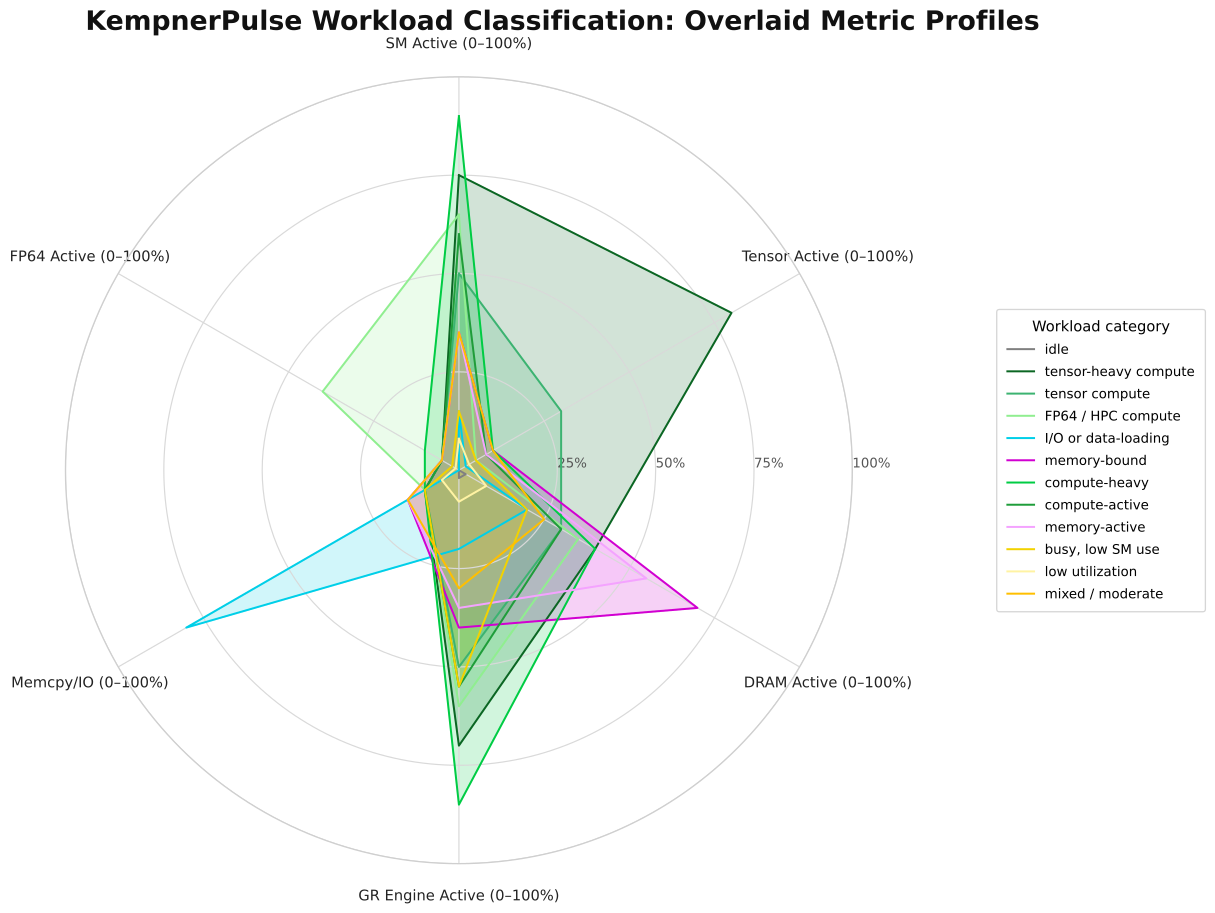
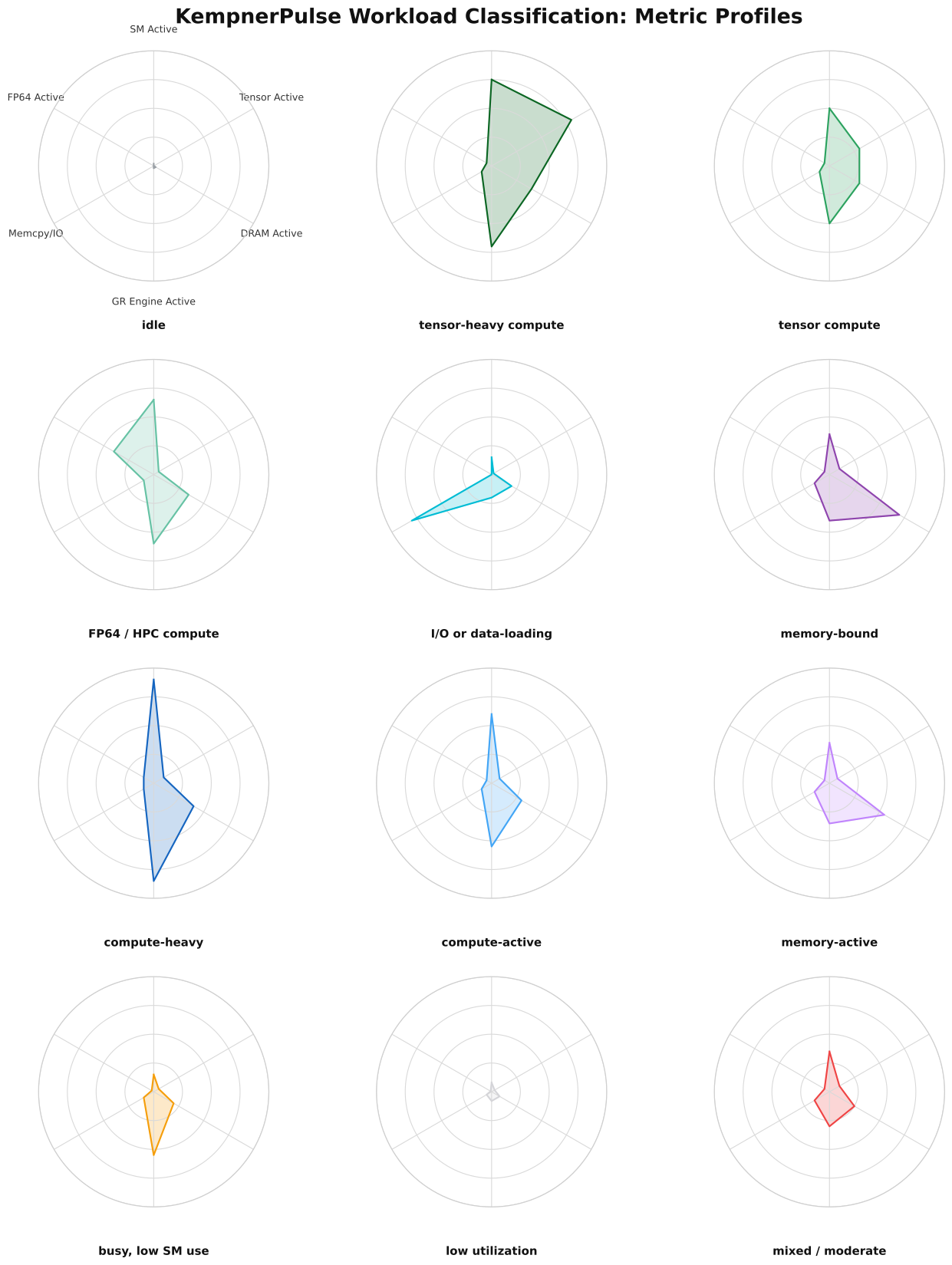
Each workload category has a distinctive metric signature across the six axes: SM Active, Tensor Active, DRAM Active, GR Engine Active, Memcpy/IO, and FP64 Active.
Overlay shows how all 12 categories compare on a single chart:
Individual profiles for each category:
Health States
Health is evaluated independently from workload classification. It checks error counters and temperatures against per-model thresholds.
Health Status Levels
Conditions are evaluated in order; the first matching condition wins.
Status |
Style |
Condition |
Action |
|---|---|---|---|
CRIT |
bold red |
Row-remap failure > 0 or uncorrectable remapped rows > 0 |
GPU has hardware memory errors. Remove from production immediately. |
WARN |
yellow |
PCIe replay rate > 0/s |
PCIe link quality issue; retransmissions occurring. Monitor closely. |
HOT |
yellow |
GPU temp ≥ warning threshold or memory temp ≥ warning threshold |
Thermal throttling zone. Check cooling and airflow. |
OK |
green |
(none of the above) |
Normal operating condition. |
Temperature Thresholds by GPU Model
GPU Model |
Normal |
Warning |
Critical |
|---|---|---|---|
A100 |
85 °C |
93 °C |
95 °C |
H100 |
85 °C |
95 °C |
105 °C |
H200 |
80 °C |
95 °C |
105 °C |
RTX 6000 |
85 °C |
92 °C |
105 °C |
Other / unknown |
85 °C |
93 °C |
105 °C |
Health Metrics
Check |
DCGM Metric |
Trigger |
Health Status |
|---|---|---|---|
ECC Row Remap Failure |
|
> 0 |
CRIT |
Uncorrectable Remapped Rows |
|
> 0 |
CRIT |
PCIe Replay Rate |
|
> 0/s |
WARN |
GPU Temperature |
|
≥ model warning threshold |
HOT |
Memory Temperature |
|
≥ model warning threshold |
HOT |